ChartDirector Visual Studio Integrated Help
ChartDirector for .NET Visual Studio Integrated Help is ChartDirector documentation in the
Microsoft Help Asset File format (msha). It can be imported into the Microsoft Help Viewer
used by Visual Studio. Visual Studio can then provide context sensitive help for the
ChartDirector API. For example, during code editing, if the text cursor is on a
ChartDirector API and the F1 button is pressed, Visual Studio can display the documentation
for that API. You can also read, search and bookmark pages in the documentation with the
Visual Studio Help Viewer.
Installing ChartDirector Visual Studio Integrated Help
- The Microsoft Help Asset File format requires Visual Studio 2010 or later versions.
- Download ChartDirector for .NET
- Visual Studio Integrated Help. Unzip it to any directory.
- Install the downloaded content into the Visual Studio Help Viewer. Below are some screen
shots. Note that due to differences in the operating system and Visual Studio versions,
the display in your system may look different from the screen shots.
 |
-
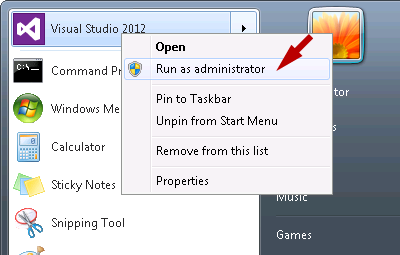
Please make sure Visual Studio is running as Administrator. This is by right
clicking on the Visual Studio icon and select "Run As Administrator".
|
|
 |
-
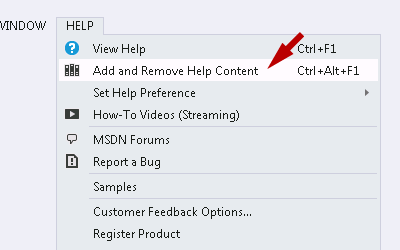
Go to "Help > Add and Remove Help Content".
-
If you do not find the "Add and Remove Help Content", your Visual Studio has not installed
Microsoft Help Viewer. Please install it first.
|
|
 |
-
If there is an older version of "ChartDirector for .NET Documentation", please click
"Remove" to uninstall it first.
-
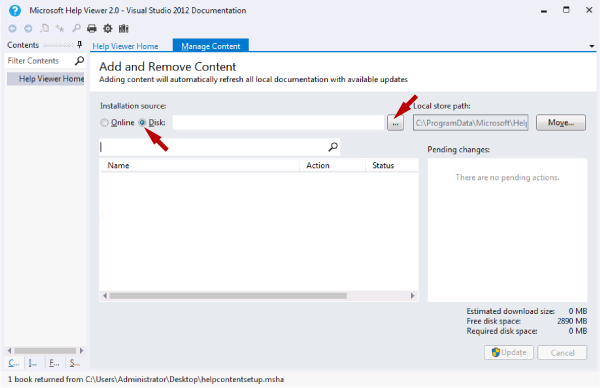
In the "Installation source", select "Disk", then press the "Browse" button to browse to the
directory containing the Visual Studio Integrated Help, and choose "helpcontentsetup.msha".
|
|
 |
-
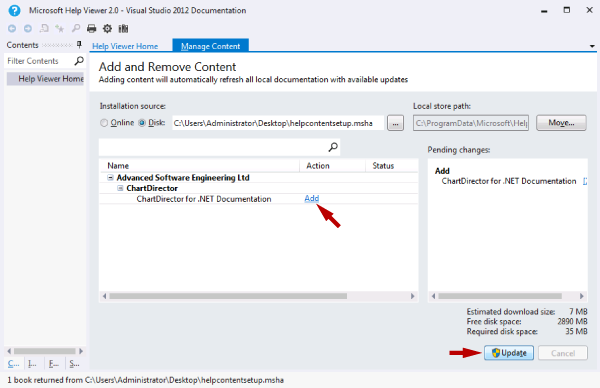
Click "Add" to select the "ChartDirector for .NET Documentation", then click "Update".
- Visual Studio may prompt you for administrator privileges. In this case, click "Yes" to
proceed.
- Installation may take a few seconds to a few minutes, depending on system configuration.
|
|
 |
-
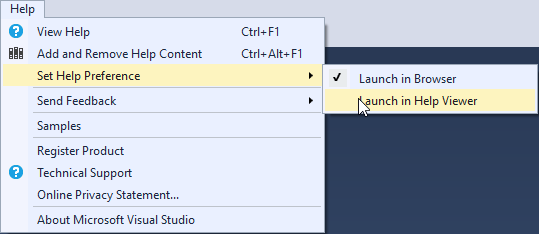
To use the Integrated Help, Visual Studio must be configured to use the Help Viewer for its
help system (as opposed to using a browser to view only online contents from Microsoft's web
site). This can be configured by going to "Help > Set Help Preference" and select "Launch in
Help Viewer".
|
What if Visual Studio does
not have Microsoft Help Viewer?
- Microsoft Help Viewer is used to support offline help content. It is installed automatically
with VS 2010 to VS 2015. Since VS 2017, Microsoft Help Viewer becomes an optional component.
It may or may not be installed depending on the options chosen during Visual Studio installation.
If it is not installed, Visual Studio can only use online help content from Microsoft's web site,
but not third party help content.
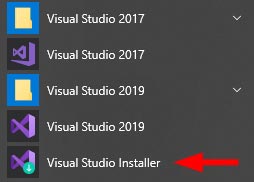
- Visual Studio 2017 and 2019 should leave a Viusal Studio Installer icon in the Start menu.
This allows you to run the Visual Studio Installer again to add or remove options. You can
use it to add Microsoft Help Viewer to Visual Studio.
- Please refer to Microsoft's web site or documentation for more details. For your reference,
we have prepared some screen shots for VS 2017 / VS 2019.
 |
-
Launch Visual Studio Installer.
|
|
 |
-
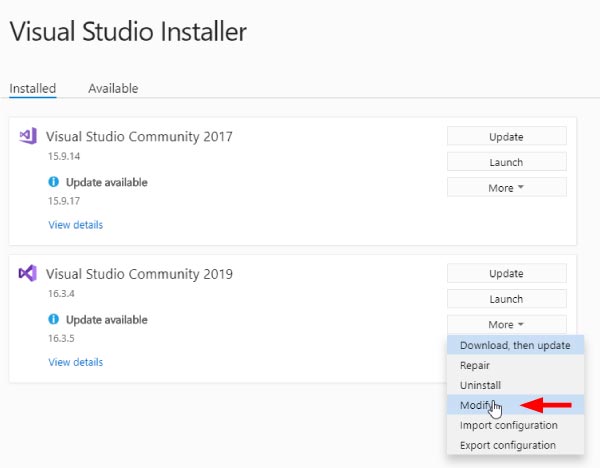
Click on "More > Modify".
|
|
 |
-
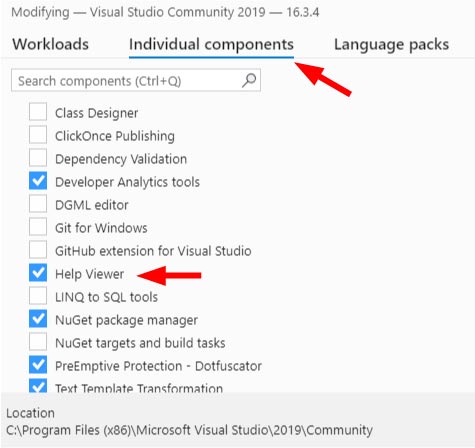
Click the "Individual Components" tab. Select the "Help Viewer" option.
-
Click the "Install" button at the bottom of the window.
|